|

|
|
Inspections |
|
Inspections >Defect Detail |
|
|
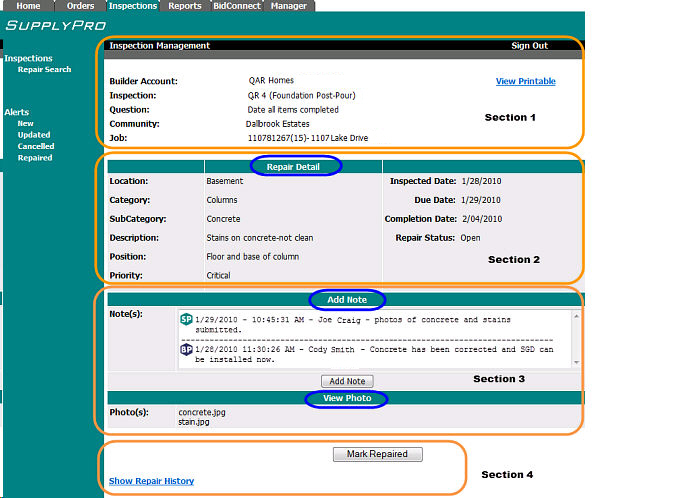
The Inspection Defect Detail Screen Header
includes the following information:
Builder
Account: Assigned Trade Builder Account
information
Inspection:
Associated
Inspection Name
Question:
Question
associated with this Defect
Community: Community
information associated with this Defect
Job: Job
Name
View Printable:
Assigned Trade can print
a Defect report
The Inspection Defect Detail Screen Repair
Detail includes the following information:
Location: Location associated with this defect i.e.: Garage
Category:
Category associated with this defect i.e.:Gutters/Downspouts
SubCategory:
SubCategory associated with this defect
i.e. Downspouts
Description: Description associated with this defect
i.e. Damaged
Position: Position associated with this defect
i.e. Front
Priority:
Defect
priority i.e. Critical
Inspection
Date: Inspection
Date
Due
Date: Due
Date
Completion
Date: Completion Date
Repair Status:
Defect
Status i.e. Open
The Assigned Trade can also Add a Note by clicking
the Add Note button. This note
will be instantly shared with the Builder
The Assigned Trade can View Photos associated
with the defect
The Assigned Trade can Mark the Defect
Repaired by clicking the Mark Repaired
button
The Show/Hide Repair History link allows
the Assigned Trade to toggle on and off the associated defect history.