|
When the Assigned Trade (supplier) logs into SupplyPro they will now
see an alert matrix for SWIM on the SupplyPro Home tab
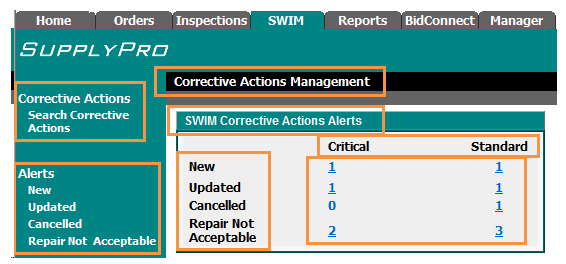
From the Corrective Actions Search link An Assigned Trade can Search
by Builder Accounts, Subdivision, Job,
Alert Type or Priority
From the Alerts links an assigned trade can search for alerts filtered
by status (New, Updated, Cancelled, Repair Not Acceptable)
From the SWIM Corrective Actions Alerts
section the Assigned Trade (supplier) can select an
alert in the Inspections SWIM Corrective Actions Alerts matrix. When an
alert is selected the user will be taken to the SWIM page.
On the Inspections tab a list will display where the Assigned Trade
(supplier) can view all the alerts by status.
Example:
If the Supplier has New (Status) Critical
(Priority) Corrective Action they will see all corrective actions assigned
to them that meet those criteria Drill into the number associated with that status and
priority to review detailed information regarding those Corrective Actions.
From the Alert list, the Assigned Trade (supplier) can drill down into
the Inspection repair by selecting the description field. The description
field is hyperlinked and when selected will display the SWIM Corrective
Action details.

|